Top 7 SEO Blogs

Top 7 SEO Blogs
Blogtricksandtips1.blogspot.com After seeing Adam’s list of blogs for creative writers and noticing an SEO blog, I couldn’t resist the temptation to put together my own list of must-read SEO blogs. Whether or not the industry has a bad reputation among bloggers, staying abreast of search engine news can give your blog a real edge over the competition. What can I say; I can’t help but defend my profession.

Here’s my rundown of the top seven SEO blogs (ordered alphabetically; it’s really hard to rank them against each other for such a broad category).

    Bruce Clay, Inc. Blog – Bruce is an old name in the industry. His blog is a great resource for SEO news and tips in general. What keeps me coming back, though, are the hilarious in-post comment wars he has with Susan. Think we could do something like that, Daniel?
    Marketing Pilgrim – Andy Beal’s got some great material on a variety of different marketing-related topics, including a lot of articles on SEO and blogging.
    Matt Cutts: Gadgets, Google, and SEO – There’s nothing quite like getting news straight from the source. Matt works for Google. He’s a great read to begin with, but you just can’t beat his blog for authority when it comes to the internet’s #1 search engine.
    Search Engine Land – Although the blog itself has only been around for a few months, Danny Sullivan has been an SEO bigwig for much longer.
    Search Engine Roundtable – If you want to stay abreast of conversations on the hottest SEO discussion boards (e.g. Cre8asite, WebmasterWorld, DigitalPoint, etc.) without, well, having to read them, this blog is your first stop.
    Search Engine Watch – This blog is definitely one of the oldest and most respected sources for search engine news. It’s a bit drier than the others; good for information, bad for personality, but still useful if all you’re interested in are the facts.
    SEOmoz Daily SEO Blog – Rand Fishkin and co. provide some great information. Be sure not to miss their whiteboard fridays.

The way I see it, as a blogger, you can hate SEO professionals for their methods or learn from their success. And since you can’t beat them (they rank too well for that), you might as well join them. ;)

Update: This is Daniel writing. While the blogs that Stephen listed are certainly awesome, I think that there are 3 missing: PronetAdvertising, Search Engine Journal and SEO Blackhat. Make sure to check them out as well!
Write and Promote Your Posts the Right Way

Write and Promote Your Posts the Right Way

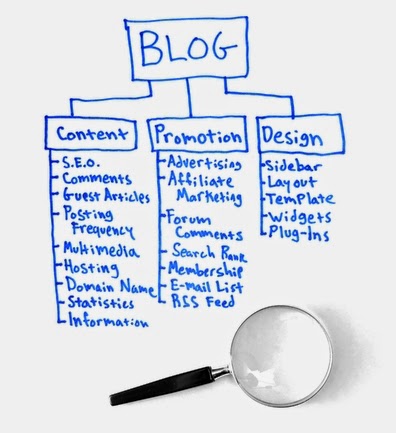
Once in a while I like to recommend resources and posts from around the web. I believe this helps to expand the community around the site (as the bloggers I mention usually become readers themselves), and it also enriches the content, as you get to read stuff from other people and from different perspectives. Today I have three awesome posts for you:

1. How to write a blog post: The definitive 8,317-word guide your mom will understand

Kevin recently did a guest post here, and that is how I discovered his site. This post caught my attention because it’s a monster. As the title says, it has over 8000 words! It basically covers all the aspects you can imagine about writing a blog post, so definitely worth reading.

Here’s a quotation:

    If you haven’t already, you’ll eventually ask someone whether it’s better to write long posts or short posts.

    Short posts allow you to write more frequently, which depending on whom you ask is either a great or horrible thing.

    And long posts, in theory, should take longer to write. Which means you won’t publish posts as frequently, which, again, is either a great or horrible thing depending on the person you’re asking.

2. How to Promote Your Blog Posts

Guess what comes after publishing that nice post? Promotion! If you don’t promote it, even if it’s a great post, people will not come to read it. This post on the BloggingTechniques blog explores 7 methods you can use to get the word out about your post. Here’s a quotation:

    Email signature, best prevailing tool to promote blog posts. Wisestamp gives you the ability to add additional features to your normal signature. It’s one of the best Google chrome extension. You can add social profile in your signatures as well as add latest post, tweets and much more.

3. 25 Experts Share How They Convert Visitors into Fans

Once your post is published and the visitors are coming, it will be time to convert those visitors into loyal readers and fans, and that is what this post is about. Karl interviewed 25 experts from around the web, asking what’s their secret formula. You’ll find answers from a wide range of entrepreneurs and styles. Here’s a quotation:

    The one thing that helped me turn visitors into fans is that I continually help them. And I do so selflessly. I never ask them for anything in exchange, I just help them because I enjoy seeing other people succeed.

    If you help your visitors without asking for anything in exchange, you will convert them into fans.

How I Moderate Comments

How to Moderate Comments
How I Moderate Comments
Blogtricksandtips1.blogspot.com - How I Moderate Comments - At least once a week I receive an email from a reader whose comment was waiting for moderation but never made it to the blog. What happened? Probably I didn’t approve it.

While I don’t remember the reason for not approving every single comment, I do know the pattern I use to approve/delete comments waiting for moderation, and I believe it might be useful if you care about your comments showing up, either in this blog or on others.

Below you’ll find the factors I take into consideration, from most important to least:

1. Does the comment contain a link?

If it does there’s a 90% chance I’ll delete it. The only exception is those comments where the link is really relevant to the content of the post. For instance, the post mentions something but doesn’t cover it in detail, and the commenter posts a link to an article explaining that concept. Other than that, link equals deletion.

Note: I mean a link in the body of the comment. I am fine with people listing their websites, which will appear as a link on their names.

2. Does the commenter left a real name?

If you use a keyword as your name, such as “Cheap Auto Parts” or “Best Vacation Places” I’ll delete your comment right away.

Even if your name is not a keyword but something weird like “yaffffi” or “rakhkun,” I’ll think twice before approving it. Sure, I’ll read the body of the comment to decide, but not using a real name certainly won’t help you.

3. Is the comment relevant to the post? Does it add value?

If I can’t connect the main message of your comment with the topic of the post I’ll probably delete it, cause I can’t be sure it’s spam or not.

Sometimes the comment might be relevant, but it doesn’t add any value. For instance, on a post about diet-coke you might writing this comment: “Wow, nice post about diet-coke!”. It’s relevant, but doesn’t add any value whatsoever, so the comment will be deleted.

What about you. What factors do you take into consideration when moderating comments?
Blog Tricks

71 Ideas for Blog Post Titles

71 Ideas for Blog Post Titles
Blogtricksandtips1.blogspot.com - 71 Ideas for Blog Post Titles - It looks like this will be “Inspiration Week.” Wednesday I mentioned a report I came across containing 212 blog post ideas. Today I came across a similar post. Instead of a report it’s an infographic, containing 71 ideas for blog post titles.

The cool thing about the infographic is that it goes straight to the point. You can quickly scan it and get ideas for future posts. It was created by the design company Verve.

Open Sans vs Lato : A head to head Comparison

Open Sans vs Lato : A head to head Comparison
Blogtricksandtips1.blogspot.com - Open Sans vs Lato : A head to head Comparison - Can't decide what to choose between Open Sans and Lato just like many other designers and developers ? Here is a brief article which would help you to pick up a font for your next web project.
Fonts were and are integral part of a website designs. In today's modern web designing world, there are thousands of font available and two of the most used ones are - Open Sans and Lato. Both these fonts are sans serif typeface and extensively used worldwide. Both of these fonts are free and resemble to each other in a lot of features, which pushes the designer in a state of dilemma. So here is a quick review so sort this problem out.

Direct Comparison

First of all we would see the two fonts together for almost same font weights. The sole purpose of fonts are to make text look good so lets see side by side comparison of these fonts.

Font Weight - 100 Hairline/Thin

Lato - Lorem ipsum dolor sit amet, consectetur adipiscing elit.
Open Sans - Not Available

Font Weight - 300 Light

Lato - Lorem ipsum dolor sit amet, consectetur adipiscing elit.
Open Sans - Lorem ipsum dolor sit amet, consectetur adipiscing elit.

Font Weight - 400 Normal/Regular

Lato - Lorem ipsum dolor sit amet, consectetur adipiscing elit.
Open Sans - Lorem ipsum dolor sit amet, consectetur adipiscing elit.

Font Weight - 600 Semi Bold

Lato - Not Available
Open Sans - Lorem ipsum dolor sit amet, consectetur adipiscing elit.

Font Weight - 700 Bold

Lato - Lorem ipsum dolor sit amet, consectetur adipiscing elit.
Open Sans - Lorem ipsum dolor sit amet, consectetur adipiscing elit.

Font Weight - 800/900  Ultra Bold / Extra Bold

Lato - Lorem ipsum dolor sit amet, consectetur adipiscing elit.
Open Sans - Lorem ipsum dolor sit amet, consectetur adipiscing elit.

Different people have different taste and opinion of one would surely not be what the other thinks. So I would try my best to judge it in an unbiased way. In the above comparison I think that Lato provides a bit more variety in look eliminating the need of other fonts. Moreover it include Hairline font weight which is not commonly found in fonts. No doubt Open Sans looks good but due to the above mentioned advantage. The winner of this stage is Lato.

Speed Optimization

When it comes to font, the second thing we look at is its speed. Today's websites need to be fast loading and one would never want to load tons of fonts for making a site look good. Sacrificing speed for fonts is not always a good idea.
Open Sans vs Latio
Open Sans Vs Latio

From the above images its quite clear that Lato is a quite heavier font compared to Open Sans. Open Sans is more than 3 times faster and light weight than Lato. So here the clear winner is - Open Sans
Character Sets

Some sites would need multiple scripts like Cyrillic etc. but there are not many fonts which provide sub sets. Here is a list of character sets the fonts Lato and Open Sans have.

Lato -

    Latin

Open Sans -

    Cyrillic Extended (cyrillic-ext)
    Greek Extended (greek-ext)
    Greek (greek)
    Vietnamese (vietnamese)
    Latin Extended (latin-ext)
    Cyrillic (cyrillic

This section does not need few more words. Winner - Open Sans

Font Rendering and Readability

I checked both the fonts in a couple of browsers and I found a minor issue in the readability of Hairline font weight of Lato. But font rendering and readability defers from browser to browser, site to site and background to background. It maybe be that the hairline font weight looks better in dark background or so. You can know more about this topic at Typekit's Blog. They have put detailed posts regarding this topic and I highly recommend to read those posts. So as I said one could not determine a winner is this section here there is No Winner

Conclusion


Both the fonts are frequently used and sometimes together too. They have become an essential part of Flat UI Modern designs. It would be great if in the near future machines are preloaded with these fonts. Would help millions to save a fraction of a MB :P Coming to the point the winner of this comparison is Open Sans. Lato is not bad either but a point behind Open Sans. Both these fonts load your webpage with awesomeness.
Please See - All the data above are only acquired from Google Fonts and no other source. Thanks for reading.

next Blog Tricks

How To Research On A Domain Before Purchase?

How To Research On A Domain Before Purchase?

Blogtricksandtips1.blogspot.com - How To Research On A Domain Before Purchase? Are you doing your homework before buying new domains? When purchasing new domain names, chances are they might not exactly be 'new'. It could have been registered and abandoned by someone else before. Or worse, it could have been involved in malicious activities that could have resulted in search penalties. So how can one do prior research to check if a domain is safe before actually buying it?


Site search

First step: do a site search. Search Google for "site:yourdomain.com" (minus the quotes), and you should come across pages from that domain, provided that there's some content on it. If you can see results from that domain, including the latest content, then that domain is in great shape, and has no indexing problems.

However, be mindful of the fact that if a domain is parked, it won't usually return any result for a site search. So unless a domain name is parked, absence of results in site search can be  pretty bad sign.


Name Search

Search the Google for the name of the domain it self. For example, "mybloggertricks" or "abcblog". This often helps you find out about the bad reputation (if any) of a domain. People could be talking about that domain name somewhere on the internet, or could be spamming with it. Check out what results get pulled out, and see if any of them indicates some cause for concern.
Internet Archive

If you go to archive.org, and put in a domain, it will show you what the previous versions (if any) of the site looked like. And if a site looks like it was spamming, then that is definitely reason to be more cautious, and maybe steer clear of that domain altogether. The previous owner might have burnt that domain to the ground, and you will have to do a lot of work to get it up and running again.


Buying an existing domain

If you're buying a domain from someone who currently owns it, you can ask them to let you see the Webmaster Tools console and/or the Analytics for that domain. Check for any messages from Google in GWT, and analyze Analytics trends. For example, the traffic might have risen up due to spam activity, or dropped significantly thereafter due to a penalty. You can inquire about these changing trends from the current owner.

Google Launches Algorithm To Give Local Searches More Importance

Google Launches Algorithm To Give Local Searches More Importance
Blogtricksandtips1.blogspot.com - According to Google, 95% of the customers look for local businesses online. Another fact has it that 73% of online activity is related to local content. Since Google is the only search giant that boasts of a 66% share in the market, we can only assume the facts are accurate. But one thing is for certain - local businesses stand to gain much with online promotion. And since Google just released a new algorithm to provide more useful and relevant local search results to users, this area has now become very important for local business owners to look at.

The new algorithm aims to provide more useful, relevant and accurate local search results that are tied more closely to traditional web search ranking signals. This means that they'll be ranked in much the same as normal search results.

For now, the changes will only effect Google Maps and Google Web search results - no news or in-depth article results, no image or video results.

According to Google, the new local search algorithm ties deeper into their web search capabilities, including the hundreds of ranking signals they use in web search. It also takes other signals into account, such as Knowledge Graph, spelling correction, synonyms and more.

Furthermore, the algorithm is supposed to improve Google's distance and location ranking parameters, which means it gives local businesses such as shops, restaurants, and so on to attract a lot of local customers living nearby.

Right now, the new algorithm is only being tested out for U.S. (English) search results. There hasn't been an update on if, and when Google will roll the update to more countries and languages. But it's gotta be soon, we estimate a few weeks or months at most.

Right now, there has not been an indication of the percent of total queries impacted by this algorithm. Most of the changes are behind the scenes, but some local businesses may suddenly notice an increase or decrease in traffic, leads or conversions.

If you deal in local business, and have seen an increase or decrease in traffic lately, let us know about it in the comments section below! All the best :)